DaVinci Resolve: Revolutionizing Still Photography with Advanced Color Tools
By Blackmagic Design
AI Summary
DaVinci Resolve brings Hollywood's renowned color grading tools to the realm of still photography with its Photo page, offering photographers and colorists an unprecedented level of control and creativity. This platform allows professionals to leverage DaVinci's extensive toolset, including AI tools, Resolve FX, and Fusion FX, to enhance still images with the same precision and artistry as motion pictures.
## DaVinci Color Tools for Still Images
Photographers can now utilize the sophisticated color correction capabilities of DaVinci Resolve, such as primary color correction, curves, and Power Windows, to create complex grades using a node-based workflow. This approach surpasses the traditional layer-based methods of other photo applications. The inclusion of professional scopes like parade, waveform, and vectorscope further enhances the precision of color grading.
## Familiar Photography Tools and Formats
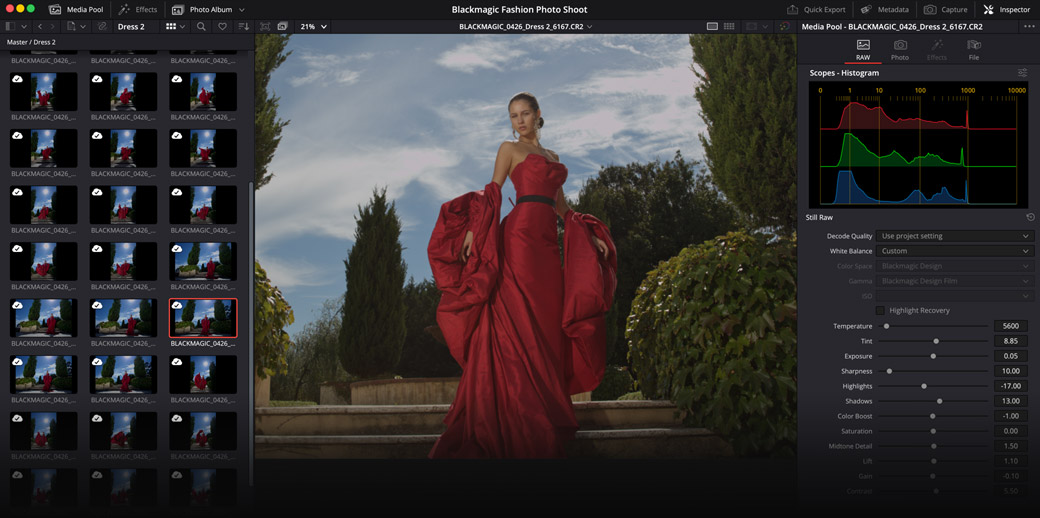
The Photo page integrates familiar photography tools with DaVinci's advanced features, supporting native RAW formats from major camera brands and processing images at resolutions up to 32K. Non-destructive editing allows for flexible adjustments, ensuring that photographers can reframe, crop, and reinterpret images without losing original data.
## Non-Destructive Transform and Cropping
With precise control over transform and cropping parameters, photographers can adjust images non-destructively, maintaining original resolution and aspect ratio. This flexibility is ideal for refining composition or preparing images for specific formats without compromising quality.
## Collaborative Workflow
DaVinci Resolve's cloud-based workflow facilitates seamless collaboration, allowing multiple users to work on the same project simultaneously. This feature is particularly beneficial for remote grading sessions, enabling Hollywood colorists to participate in live shoots from afar.
## Image Management and Albums
The platform offers robust image management tools, allowing users to import, tag, and organize photos efficiently. AI IntelliSearch enhances the ability to locate specific images quickly, while albums provide a structured way to manage photo collections and apply consistent grading across multiple images.
## Camera Tethering for Live Capture
Photographers can connect their cameras directly to DaVinci Resolve for tethered shooting, enabling real-time adjustments and grading during live captures. This integration streamlines the workflow, ensuring that images are organized and graded as they are captured.
## Powerful AI and Resolve FX Tools
The Photo page includes over 100 Resolve FX and AI tools, offering a wide range of effects from color adjustments to cinematic lighting. Tools like Magic Mask and Depth Map allow for precise selection and grading of different image depths, while Relight FX adds realistic lighting post-capture.
## Quick Export and GPU Acceleration
Quick Export simplifies the delivery of finished images in various formats, preserving original metadata. GPU acceleration ensures fast processing and export times, optimizing performance across different systems.
## Hardware Panels for Rapid Edits
DaVinci Resolve's hardware panels provide tactile control for color grading, enabling photographers to make adjustments more intuitively and efficiently than with traditional mouse and keyboard setups.
Key Concepts
Color grading is the process of altering and enhancing the color of a motion picture, video image, or still image. It involves adjusting various attributes like contrast, color balance, and saturation to achieve a desired aesthetic.
Non-destructive editing refers to the ability to make changes to an image without permanently altering the original file. This approach allows for flexibility in editing, as changes can be reversed or adjusted without loss of quality.
Category
TechnologyMore on Discover
Summarized by Mente
Save any article, video, or tweet. AI summarizes it, finds connections, and creates your to-do list.
Start free, no credit card