Nintendo DS Homebrew Programming Guide
By Jaeden Amero
AI Summary
Welcome to the world of Nintendo DS homebrew programming! If you've ever dreamt of creating your own games for the DS, this manual is your gateway to understanding the inner workings of this dual-screen wonder. We'll explore the basics of DS programming, from setting up your environment to understanding the politics behind the homebrew movement.
## Getting Started
To embark on this journey, you'll need a basic understanding of C or C++ programming. If you're new to these languages, I recommend spending some time with tutorials and practicing coding to get a grip on structs, classes, and operators. Once you're ready, dive into the chapters of this manual, each building on the last to guide you through the process of game development on the DS.
## The Homebrew Movement
The homebrew community is a vibrant group of enthusiasts who reverse-engineer hardware to allow anyone to create software for systems like the Nintendo DS. While Nintendo's official development kits are out of reach for most, homebrew offers a legal and accessible alternative. By owning the hardware, you can legally experiment and create, as long as you steer clear of piracy and respect proprietary protections.
## Passthrough Devices
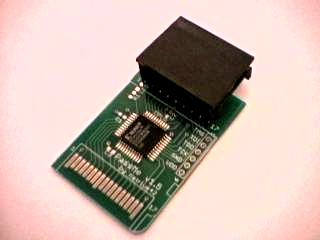
Passthrough devices, like the PassMe, allow you to run homebrew software on the DS by bypassing the system's encryption. These devices have evolved over time, with newer solutions like NoPass and Slot-1 devices offering more seamless integration and ease of use. Choosing the right device depends on your DS model and your development needs.
## Setting Up Your Environment
To start coding, you'll need devkitARM and libnds, tools that simplify the process of compiling and running your programs on the DS. These tools are part of the devkitPro suite, which provides everything you need to create software for the DS and other ARM-based systems.
## Displaying Graphics
Understanding how to display graphics on the DS is crucial. The system uses two graphics engines, each capable of handling multiple backgrounds and sprites. Mode 5 is a popular choice for its flexibility, allowing for impressive effects with affine transformations. You'll learn to set up backgrounds and manage VRAM to display your graphics efficiently.
## Working with Sprites
Sprites are a key component of DS graphics, allowing for dynamic and interactive visuals. The DS hardware supports up to 128 sprites, with various options for color depth and transformations. You'll learn to manage sprite attributes, update the Object Attribute Memory (OAM), and use DMA for efficient memory operations.
## Advanced Techniques
As you progress, you'll delve into more advanced topics like using DMA for memory operations, setting up affine transformations, and managing sprite priorities. These techniques will help you create more complex and polished games.
By the end of this manual, you'll have the knowledge and tools to bring your game ideas to life on the Nintendo DS. Whether you're creating simple demos or full-fledged games, the homebrew community is here to support and inspire you.
Key Concepts
A community-driven initiative where enthusiasts create software for hardware platforms without official support from the manufacturer. It often involves reverse engineering to understand the hardware.
Hardware tools that allow unofficial software to run on a system by bypassing its security measures. They are used to load homebrew applications onto devices like the Nintendo DS.
Category
ProgrammingOriginal source
https://www.patater.com/files/projects/manual/manual.htmlMore on Discover
Summarized by Mente
Save any article, video, or tweet. AI summarizes it, finds connections, and creates your to-do list.
Start free, no credit card